2022. 12. 5. 16:39ㆍ카테고리 없음
AngularJS — Superheroic JavaScript MVW Framework
document.createElement('tabs'); document.createElement('pane'); document.createElement('ng-pluralize'); <!-- Prompt IE 6 users to install Chrome Frame. Remove this if you support IE 6. chromium.org/developers/how-tos/chrome-frame-getting-started --> Yo
angularjs.org
공식문서
W3Schools Free Online Web Tutorials
W3Schools offers free online tutorials, references and exercises in all the major languages of the web. Covering popular subjects like HTML, CSS, JavaScript, Python, SQL, Java, and many, many more.
www.w3schools.com
-AngularJS is a JavaScript Framework
1. ng-app , ng-model , ng-bind (데이터 바인딩) {{ }}
<script src="http://ajax.googleapis.com/ajax/libs/angularjs/1.4.8/angular.min.js"></script> <!-- cdn angular connect -->

<div ng-app="">
   <p>Name: <input type="text" ng-model="name"></p>
   <p ng-bind="name"></p>
</div>

2. ng-init
<div ng-app="" ng-init="firstName='John'">
<p>The name is <span ng-bind="firstName"></span></p>
</div>

<!--<div data-ng-app="" data-ng-init="firstName='John'">
<p>The name is <span data-ng-bind="firstName"></span></p>
</div>-->
3. angular mustache
{{ }} == ng-bind 표기법
<div ng-app="">
   <p>My first expression: {{ 5 + 5 }}</p>
</div>

<div ng-app="">
  <p>Name: <input type="text" ng-model="name"></p>
  <p>YOUR NAME: {{name}}</p>
</div>

<div ng-app="" ng-init="myCol='red'">
<input style="background:{{myCol}};" ng-model="myCol" value="{{myCol}}">
</div>

<div ng-app="" ng-init="quantity=1;cost=5">
<p>Total in dollar: {{ quantity * cost }}</p>
</div>

<div ng-app="" ng-init="quantity=1;cost=5">
<p>Total in dollar: <span ng-bind="quantity * cost"></span></p>
</div>

<div ng-app="" ng-init="firstName='John';lastName='Doe'">
<p>The name is {{ firstName + " " + lastName }}</p>
</div>

<div ng-app="" ng-init="firstName='John';lastName='Doe'">
<p>The name is <span ng-bind="firstName + ' ' + lastName"></span></p>
</div>

<div ng-app="" ng-init="quantity=1;price=5">
Quantity: <input type="number"	ng-model="quantity">
Costs:    <input type="number" ng-model="price">
Total in dollar: {{ quantity * price }}
</div>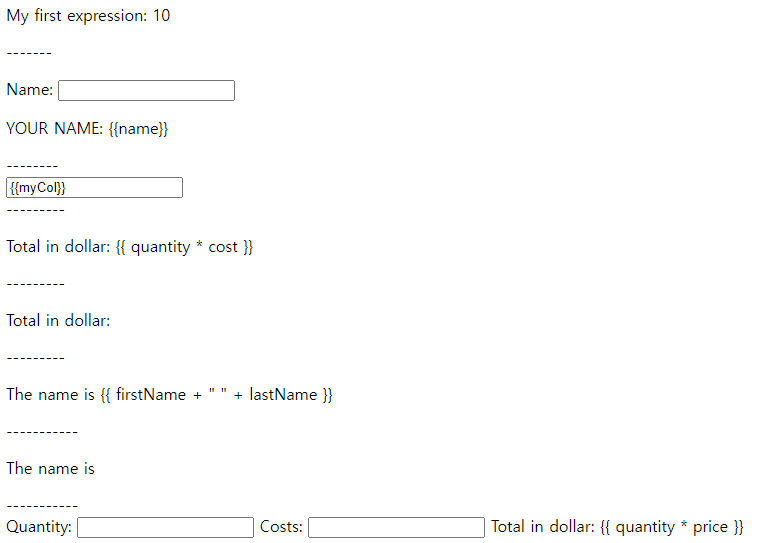
4.AngularJS Objects
<div ng-app="" ng-init="person={firstName:'John',lastName:'Doe'}">
<p>The name is {{ person.lastName }}</p>
</div>

<div ng-app="" ng-init="person={firstName:'John',lastName:'Doe'}">
<p>The name is <span ng-bind="person.lastName"></span></p>
</div>
5.AngularJS Arrays
<div ng-app="" ng-init="points=[1,15,19,2,40]">
<p>The third result is {{ points[2] }}</p> <!-- js의 array 호출문과 동일 -->
</div>
6. AngularJS Module , AngularJS Controller
<!-- AngularJS Module  -->
var app = angular.module('myApp', []);

<!-- AngularJS Controller -->
app.controller('myCtrl', function($scope) {
    $scope.firstName= "John";
    $scope.lastName= "Doe";
});

<div ng-app="myApp" ng-controller="myCtrl">
     First Name: <input type="text" ng-model="firstName"><br>
     Last Name: <input type="text" ng-model="lastName"><br>
    <br>
     Full Name: {{firstName + " " + lastName}}
</div>

<script>
     var app = angular.module('myApp', []);
     app.controller('myCtrl',  function($scope) {
         $scope.firstName= "John";
         $scope.lastName= "Doe";
     });
</script>

---------------------------

<div ng-app="myApp" ng-controller="myCtrl">
    Name: <input ng-model="name">
    <h1>You entered: {{name}}</h1>
</div>

<script>
    var app = angular.module('myApp', []);
    app.controller('myCtrl', function($scope) {
        $scope.name = "John Doe";
    });
</script>

7.Adding a Directive
<div ng-app="myApp" w3-test-directive></div>

<script>
var app = angular.module("myApp", []);

app.directive("w3TestDirective", function() {
    return {
        template : "I was made in a directive constructor!" // 속성값으로 data 컨트롤
    };
});
</script>
8.Modules and Controllers in Files
<div ng-app="myApp" ng-controller="myCtrl">
    {{ firstName + " " + lastName }}
</div>

<script src="myApp.js"></script>
<script src="myCtrl.js"></script>

------
<!-- myApp.js
 var app = angular.module("myApp", []);
-->
------
<!-- myCtrl.js
-app.controller("myCtrl", function($scope) {
    $scope.firstName	= "John";
    $scope.lastName= "Doe";
 });
 -->
9. Repeating HTML Elements
<div ng-app="" ng-init="names=['Jani','Hege','Kai']">
  <ul>
    <li ng-repeat="x in names"> <!-- js for in 문 과 같은 반복문 names의 길이만큼 반복 -->
      {{ x }}
    </li>
  </ul>
</div>
<div ng-app="" ng-init="names=[
    {name:'Jani',country:'Norway'},
    {name:'Hege',country:'Sweden'},
    {name:'Kai',country:'Denmark'}
]">

<ul>
  <li ng-repeat="x in names">
    {{ x.name + ', ' + x.country }}
  </li>
</ul>

</div>
위와같이 객체배열의 형태로 사용 가능
10.Create New Directives
<w3-test-directive></w3-test-directive>

<script>
    var app = angular.module("myApp", []);
    app.directive("w3TestDirective", function() {
        return {
            template : "<h1>Made by a directive!</h1>"
        };
    });
</script>
w3-test-directive 태그에 template 값을 저장해 반복사용이 용이하다